by P&T BROS | Aug 10, 2015 | Blog, Photoshop Tutorials, Web Designs
Hello People! Today We are going to share how to apply metal chrome style effect to the text in Photoshop CS6. We have an easy instruction and a PSD file. Please download the Chrome Text Effect file in PSD format. Step 01. Open Adobe Photoshop CS6 > Type...
by P&T BROS | Aug 7, 2015 | Blog, Photoshop Tutorials, Web Designs
Are you looking for how to create transparent background using Photoshop CS6? Here we are to help you guys to create an image with transparent background. It’s very easy! Please follow the instruction below. Step 01. Go to file > New ...
by P&T BROS | Aug 6, 2015 | Blog, Windows & Mac, Windows Troubleshooting
You have a genuine Windows product key entered, but when you click the activate button, you see “0x80072f8f error message ? Don’t worry! 😀 😀 😀 This does not mean that you have pirated Windows or it does not mean that you cannot activate the Windows....
by P&T BROS | Aug 6, 2015 | Blog, Photoshop Tutorials, Web Designs
Today we are sharing how to add shadow effect to text in photoshop cs6. There are several ways to create shadow effect on text in photoshop, but today we are going to share the simplest way. Please follow the instruction below! Step 01. Type anything that you...
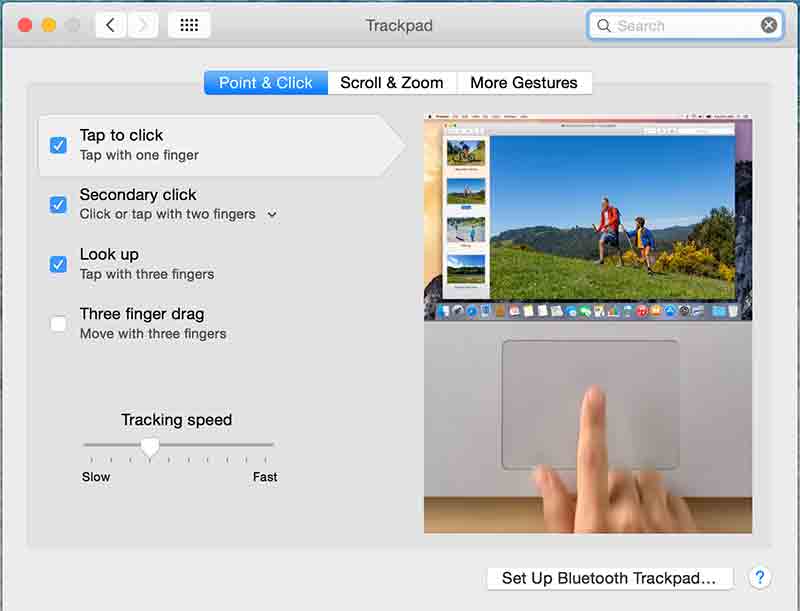
by P&T BROS | Jul 31, 2015 | Blog, Mac Tips, Windows & Mac
Today, We are going to share how to enable tap to click function in Mac OS X. If you are familiar with a Windows based laptop, you know that we used to tap to click (not clicking). But first time I got my Macbook, tab feature wasn’t working like the Windows...